The centre of a circle defined by 3
known points can be calculated using the formulae listed
here.
The program
defines a line passing equidistantly perpendicular
through the centre of a circle, then calculates the
intersection of the line and the plane of the circle.
Find the centre of a circle by
measuring the distance to one point. Useful for calculating inaccessible
vertical pipe centres or plumbing tubular columns using reflectorless EDM.
Need to know how much flat an
inclined surface is? This shows how to calculate the perpendicular
distance from a measured point to a design 3D plane (defined by 3 points).
A fully functioning Co-ordinate
Geometry program with Graphical Interface. Designed for personal use only.
For further details, updates and other versions, visit the
LandSurveyorsUnited website.
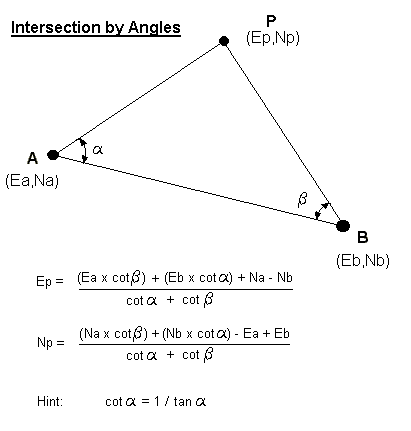
This VisualBasic program computes
Intersections from observed data. Includes example files. Users of
Leica TCR700 series should also download the "Angles.frt" file in the Leica
Format section.
This is the
latest version of StarNet. It is a fully
functional version but it is limited to adjusting 10
points. A comprehensive help file system is
included in the software.
User defined
Stylesheet to download raw observations for TS16.
Leica
Instrument Explorer for the Pocket PC
Leica
Instrument Explorer enables you to exchange data from a
total station to your Pocket PC or vice versa. Also
enables you to view and edit survey data (e.g.
coordinate files, measurement files) on the Pocket PC.
Supports
TPS400 & TPS700 Instruments in the following platforms:
To install
Leica Instrument Explorer unzip the downloaded file, and
then copy the files LeicaInstrumentExplorer.exe and
LeicaEditor.exe to the directory Windows\Start Menu\ in
the Pocket PC.
MS DOS prompt executable program to
strip co-ordinates recorded in Leica GSI format into CSV format without the need
for Survey Office or Excel. Options to output results in metres or to be
renumbered.
There is now a (poor quality) Youtube Video showing
how to pre-load the macros and create a new Toolbar. Best viewed "full
screen".
Note: Microsoft no longer supports Visual
Basic for Applications (VBA) and therefore Autodesk is gradually phasing out its
VBA add-on. The
VBAenabler is now an optional extra with each AutoCAD
version. It also uses its own Library, which changes each year.
Therefore, for versions 2013 and newer, the macros are version specific and
should not be mixed. Simply "overwrite" the previous dvb file.
The 32 & 64-bit VBAenablers
for AutoCAD 2010 onwards can be found [here]
This program is
suitable for viewing and plotting hp-gl/2 (*.plt & *.hpg) files that have been
created in other applications such as AutoCAD, without the need for such
software.
Create PDF files
from any "print" enabled program. The file is zipped and includes a
"License Code". Useful for creating PDF format drawings from AutoCAD for
clients who do not have a DWF viewer.
CutePDF Creator (Link)
Create professional PDF files from almost any printable
document. Link to free download and installation.
ZWCad is a Chinese clone of Autodesk
AutoCAD with virtually all of the same commands and
layouts!
The AutoCAD macros above have
been converted for use with ZWCAD. The following
zip file also contains a user-manual which explains
their use, how to load & run them and also how to create
a user-defined toolbar:-
Least-squares multi-point
adjustment of co-ordinates from "Observed" Arbitrary grid to
"Corrected" site grid
Helmert and Affine Solutions are included as well as
example data for each method. Helmert and Affine
Solutions are included as well as example data for each
method.
Did you use the wrong prism constant
and only have the reduced coords? This spreadsheet converts X,Y,Z back to
angles/distances, corrects the Prism Constant and then re-computes the surveyed
point(s). Station set-up coords required.
Calculates the "Best-Fit" centre of
a set of points by minimising the residual errors.
** Updated May 2026 - Corrected "offsets" and added
Standard Deviation
A spreadsheet to calculate the
shortest perpendicular distance between two 3D lines. The spreadsheet will
also display the two points on each line that are the closest.
This spreadsheet will compute the 3D
co-ordinates of a perpendicular point on a plane from a measured point. [See
graphic]. The sheet also calculates the perpendicular distance.
The spreadsheet will allow up to 10 points to be entered. Updated June 2017 to
allow the computation of up to 500 points.
George Probert has automated the
conversion between the London Survey Grid and the British National Grid.
The pdf document showing how the London Survey Grid is used can be found [here].
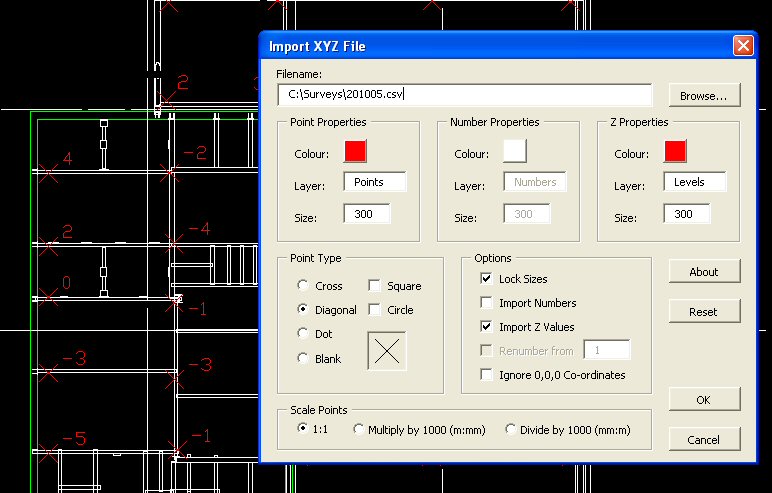
This macro enabled spreadsheet will
convert a table of co-ordinates into a DXF file which can be imported directly
into AutoCAD LT or full versions. This version will now import points as
"Points" as well as "Blocks".
August 2018
- Includes option for different Point & Text sizes
This is the Excel spreadsheet
version of the Casio fx-7400 "Line to Plane" program which calculates the
intersection point of a line (defined by two 3D points) passing through a plane
defined by three 3D points.
An updated Microsoft Excel
spreadsheet that converts CSV co-ordinates and
Observations into either GSI-8 or GSI-16 strings.
[Point, Easting, Northing, Elevation].
An Excel spreadsheet that calculates
the three-dimensional offset of a point from a line determined by two points.
See here
Useful if
you want to know how far off a line a point is, if the
reference line is not flat. The spreadsheet
calculates the Intersection Point (IP) of the surveyed
Point to the Line at right angles and also displays the
"Chainage" along the line to the IP.
Excel 2003 spreadsheet that
calculates the centre co-ordinates (and radius) of a three-dimensional circle
passing through 3 known points (X, Y, Z). Contains a macro enabled button
to clear the data.
This version
does not contain the "Clear All" macro which may cause
problems in earlier Excel versions. Data/Results
are to 4 decimal places. Thanks John.
The latest
version of my Excel spreadsheet, used to calculate and
adjust open or closed traverses. Includes an
example and diagrams.
Version 2a - Forward bearing bug fixed - Nov 2011
Version 2b - Forward
bearing bug fixed (again) - Feb 2012 [Thanks Leigh]
Version 2d - Open
Traverse renamed Linear Traverse - Feb 2012
Version 2d_100 - Updated to allow 100 stations - Jan 2014 Version 2e - The final adjusted co-ords can now be copied - May 2016 Version 2f
- The co-ords are formatted to 7+4 characters - June 2016 Version 2g
- Additional Sheet allows entry of RO coords - July 2020
The misclosures are shown
more clearly at the top of the page.
Excel 97 Macro to reduce "Sets of
Angles" data recorded in Leica GSI format. The Macro will reduce the raw
data to angles, and given the Station and RO information, reduce these angles to
co-ordinates in mm or metres.
The zip-file also contains some test
data loaded into a worksheet.
FA-122 is the official Casio
software. With it, you can send data from your computer to your calculator and
vice versa. Of course you need an interface cable. The software can also be used
to view .CAT files in a "human" form. Other features are screen captures, .CAT
files edition and creation. To send/receive .FXI programs, see the FXIWin
software below.
This zip file contains the Yellow
Computing FX Windows Interface editor used to create, view, print or modify
programs written for the Casio Power Graphic models. Version 1.9.2.
Requires special cable (FA-123 or
similar) to download or upload directly.
A land
surveying suite of software for the FX7400g+.
Requires an interface cable to install the full set of
programs properly. The website also includes
access to a complete user guide to the software and
other links.
A selection of 32 of
my own programs that
can be uploaded to the fx-7400g Plus via a PC Interface
cable (which can be purchased
separately) and
FXIWin Interface Software or to the fx-9860-GII
using the
FA-124
interface (or optional SD card).
The programs
include:
"Intersection by Bearings",
"Intersection of Lines", "Resection", "Co-ordinate
Transformation", "Chainage & Offset", "Traverse",
"Bearing & Distance", "Area", "1 Point Circle Fix", "3
Point Circle Fix", "Curve", "Point to Plane" and "3D
Circle Fix", "Survey" and "Levelling"
There is also a Users Manual
(in pdf format) including a description of the programs,
along with some examples to show how they work and
should be used.
These
programs are being supplied by an ebay user pretending
to be the author.
FX-Interface Cable
Casio Interface cables and software
are available to UK customers from "science_studio"
on ebay:
Instructions and on how to
upload/download Programs to/from your FX850P or FX880P without the need for an
expensive and no-longer produced Interface box.
This is a
demonstration version of a remote control program for
the Psion Workabout. The full version can be used
to remotely operate a TCA2003 (or similar) via a serial
cable. The program includes basic remote measuring
to a target (using ATR & Lock) for co-ordinate display,
as well as Tie-Distance and Reference Line (Chainage &
Offset) calculations. At this time there is no
facility to record the results.
This
simulated version is for the Workabout only and has the
instrument interface code removed. All "measured"
angles, distances and co-ordinates are displayed as
zero. Upload the text-file to the Workabout RS232
via Windows Terminal.
If you
require the full free version, please contact me
and show a working knowledge of the Leica remote control
system or describe a suitable application or
requirement.
This emulator is useful when testing
programs written for the Psion Workabout. However, it only will only run
under DOS. This will NOT work in the DOS window through Windows.
Your PC must be able to boot to DOS directly.
This
FREE program is the best PDF page editor that I know of.
I use it all of the time prepare reports by combining
PDF documents into a single PDF rather than zipping them
into an awkward folder.
3D Printers
have become a cheap and easy way to produce items useful
for surveying. For example, bespoke target holders can
be designed quickly and once used they can even remain
on-site for future use.
Free 3D CAD
software (as of December 2023)
3D models
can be created in AutoCAD etc. However, there are
some free alternatices.
Tim
Welds
Youtube video lists 5 free CAD programs.
The best 3D printer for you
depends upon your budget, how many times it will get
used and how experienced you are at changing some of the
pararmeters. Regardless, "buying cheap" is not
always the best
option!
To convert CAD "STL"
files into code that your 3D printer can understand, you will
need a "3D Slicer". During the conversion, you can set
the nozzle/bed temperatures and speed of the print as
well as the "density", how to manage overhangs
(supports) and even if you want to set-up a timelapse,
change filament mid-print or print several items at the
same time.
Don't want to or
can't create 3D models? There are several websites that
contain ready made shapes to download and print. Some
are free, others charge per model.
Here are
some of my favourite commands used to create and modify
some 3D shapes...
RECTANG, CIRCLE etc - Draws simple 2D shapes.
3D/POLYLINE - Create a 2D shape using a continuous
line. The points should be on the same plane -
either flat or same surface.
JOIN
- Turns a series of 2D lines into a continuous polygon.
All of the nodes must be single points (with no gaps or
crossovers) and on
the same plane.
OFFSET - Useful for giving a "wall" thickness to a 2D
shape
EXTRUDE - This will "drag" a 2D surface into a solid 3D
shape for
a defined distance.
LOFT
- Extrudes and shapes/morphs between two 2D-shapes
SOLIDEDIT - Amongst other things, will hollow a solid
shape with a defined shell thickness.
SUBTRACT - This will
remove one shape from another. ie remove a cyclinder
(hole) from a baseplate. Warning: The item being
subtracted will be deleted, so if you want to re-use it,
you should make a copy.
UNION - This joins 2
or more shapes together. Useful if you need to
perform an operation on everything. ie Fillet.
However, once joined, they cannot be (easily) separated.
FILLET - Rounds off
the corners of an object.
Commands such as
Copy, Move & Mirror are routinely used to aid 3D
drawing.
This website and
utilities are provided free of charge - however, if you have found a particular
"EngineeringSurveyor.com" feature beneficial or wish to contribute to the
continued upkeep of this site, then please feel free to offer any donation via
the PayPal link below.
Any
contributors will be recognised in a
Hall of Fame.
Disclaimer:
Neither the owner,
author or host of this website, nor any third party software provider shall be
liable for any direct, indirect, incidental or consequential damage to persons
or property resulting in the use of the above software.
You may download and
copy the content only for your own personal use, provided that you maintain all
copyright and other notices contained in such content.
No programs or
utilities may be downloaded from this site and sold without the permission of
the author.
All software offered
has been freely circulated within the public domain and is available "as-is".
However, any item may be removed without warning should it become necessary.
The appearance of
any software within these pages does not endorse the accuracy or reliability of
that software.